
Reject Calls (Black List Phone numbers) for CLOUD PBX Customers
With our CloudPBX you can reject calls by listing them in the Black List.
For Business Sip Trunks and Residential Services click on this link for more information
This is useful, if a number is spamming you day and night and you want to stop them from calling you.
To do so just follow these simple instructions:
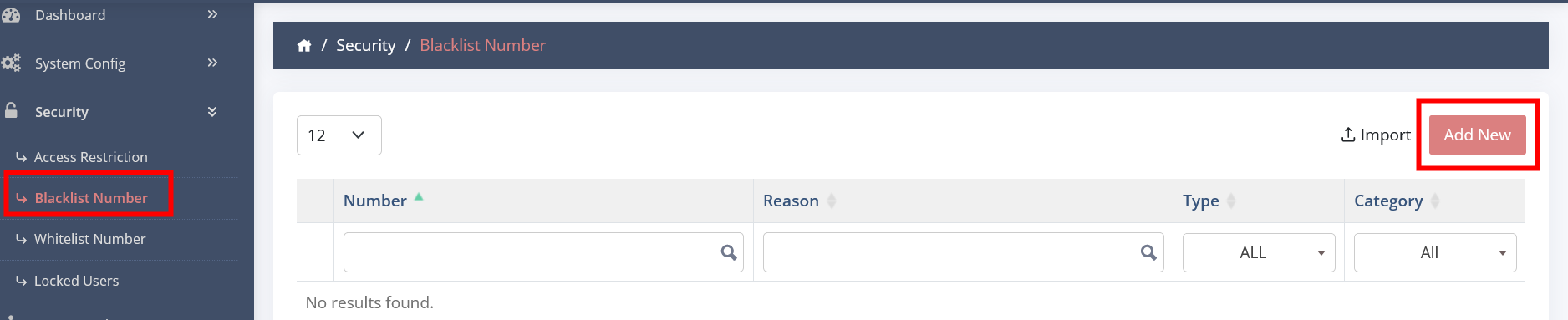
- Login in the CloudPBX
- Click on SECURITY
- Click on BLACK LIST NUMBER
- Click on ADD NEW
- Number - enter number in E164 format 612/613/614/617/618 format (for example if you want to block 07 2222 3333 enter it as 61722223333)
- Type - IN
- Category - CALL
- Reason - give a reason
- CREATE
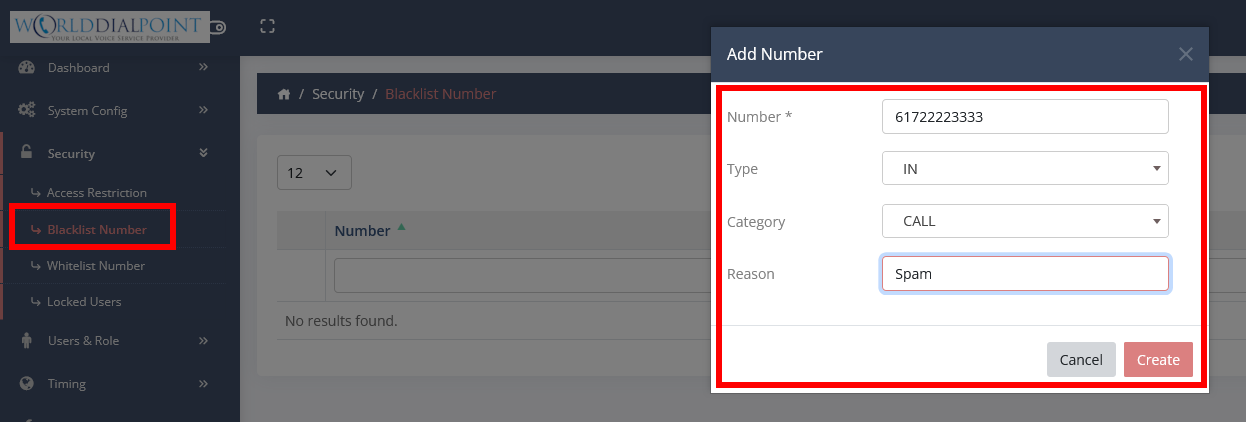
PS. You can also restrict calls to any numbers you enter for outgoing calls, just change the TYPE to OUT but you would need to enter it in every format (E164/02 03 04 07 08/8 digits without an area code/international format 011xx)
Important - As an extra security measure that we take, we already block numbers that are reported to us via our carriers and ACMA under the Spam Act.. This list is applied by defualt to every customer and is not accessible to customers.
If you want to REJECT all ANONYMOUS Calls, please give us a call and we can setup for you.
