
CID Routing (Caller ID Routing)
This Feature is very usefull, for when you have customers that you want them to get priority when calling you.
Basically you can direct their call directly to where ever you want and jump the IVR /Queues or anything else.
Example:
07 1111 2222 would like them to direct their calls straight to your manager or a priorty queue (anything)
To set up 07 1111 2222 follow these instructions:
- Login into the CLOUD PBX
- Click on CALL ROUTING
- Click on CID ROUTING
- Click on ADD NEW

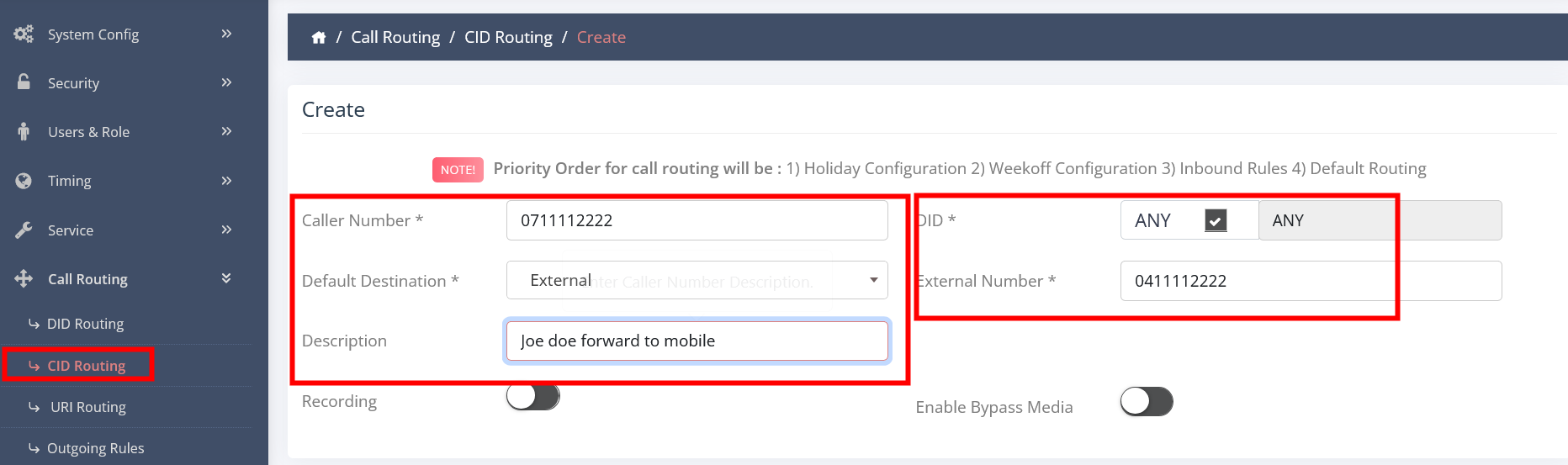
- CALLER NUMBER - Enter the phone number as 0711112222
- DID - Any
- Default Destination - Choose destination
- Default Extension - Choose from the drop down menu
- Description - Enter description
- Click on Create
That is it and you are done
You can also link that rule to Holiday configuration but you will need to setup first the Holiday Configuration in Timing.
