
Registrations of IP Phones - Access Restriction to your Network
(Security Feature)
With this feature you can increase security by restricting registration and also access to the GUI to your network. Basically what it means is you can ONLY register the IP Phones and/or access the CoudPBX from only the IP addresses listed. If let say someone tries to steal your username and password and then go home and try to connect with your information, our system will NOT allow it.
PS Limitation - Use this feature if you have static IP Addresses, otherwise if your IP is dynamic (changes everytime the internet drops out) you will not be able to connect unless you call us and let us know to desable your entries..
If you are using the Chrome APP you need to enter the Cloud PBX IP address so access via web RTC will be successful.
Login into the CloudPBX
- Click on SECURITY
- Click on ACCESS RESTRICTION
- Click on ADD

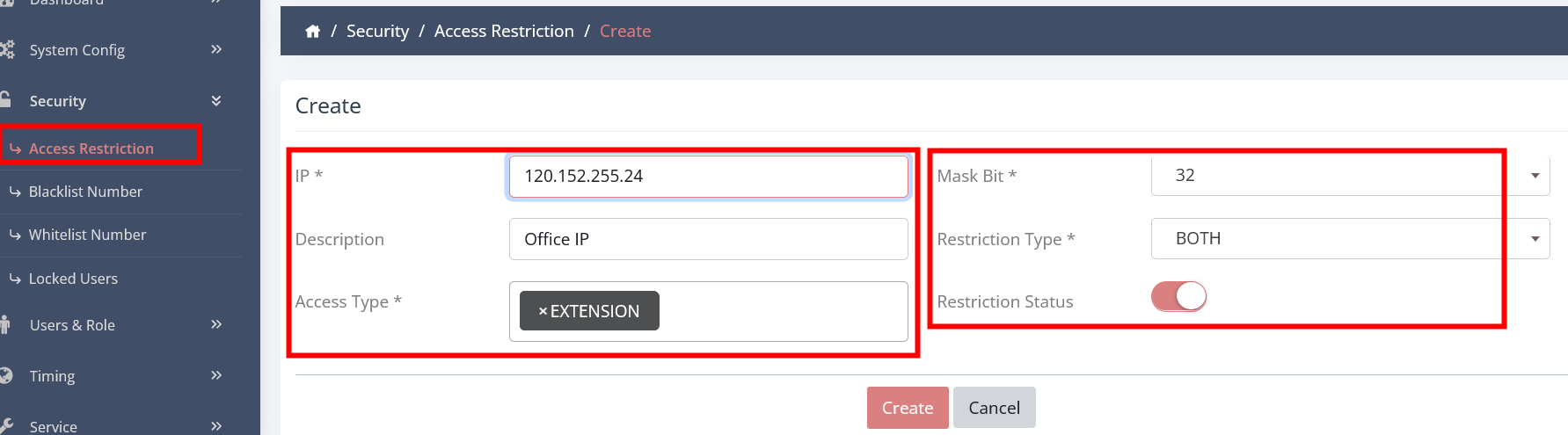
Fill in these entries:
- IP - enter your single external IP or range. (Example: Entering a range and your ip is 192.168.1.22 you then enter 192.168.1.0 and then choose the mask above 32 for example 24 (that covers 0-255 ip addresses))
- Mask - choose from the drop down menu (if it is one IP Address choose 32)
- Description - Write anything why you want to add this IP
- Restriction Type - choose from WEB / REGISTRATION or BOTH
- Access Type - Choose from the menu several times and add everthing that shows unless you do not want to.
- Restrict Status - ON
- Click on CREATE
Done
Just make sure that it is Enabled the rule
